Original article and byline published by PakFactory.
Key takeaways
A dieline is the flat blueprint that tells a manufacturer where to cut, fold, and glue your packaging.
- 01Every dieline marks cut lines, fold lines, bleed, safe zone, and glue tabs.
- 02Standard print bleed is 0.125 inches, or 3 mm, past the cut line.
- 03Production dielines are engineered in structural software, not drawn in Illustrator.
- 04Dielines must stay vector, in CMYK, as AI, EPS or PDF. Never a flattened image.
- 05Standard corrugated styles already have dielines, coded by FEFCO.
When you start shopping for custom boxes, "dieline" comes up fast. It sounds like a term only a packaging engineer would need.
It is worth understanding anyway, because the dieline is the file that decides whether your artwork lands where you intended, and whether the box folds the way you drew it. This guide covers what a dieline is, what every line on it means, how one is built, and how to get one for your own packaging.
What Is a Dieline?
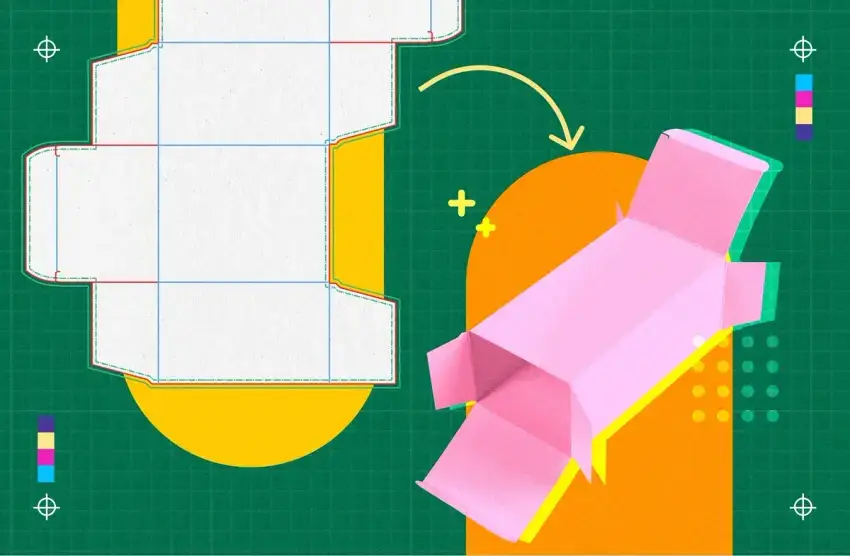
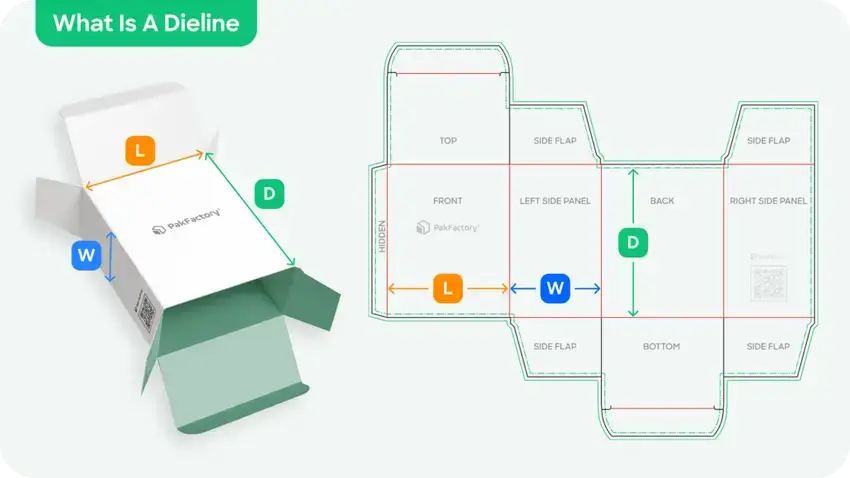
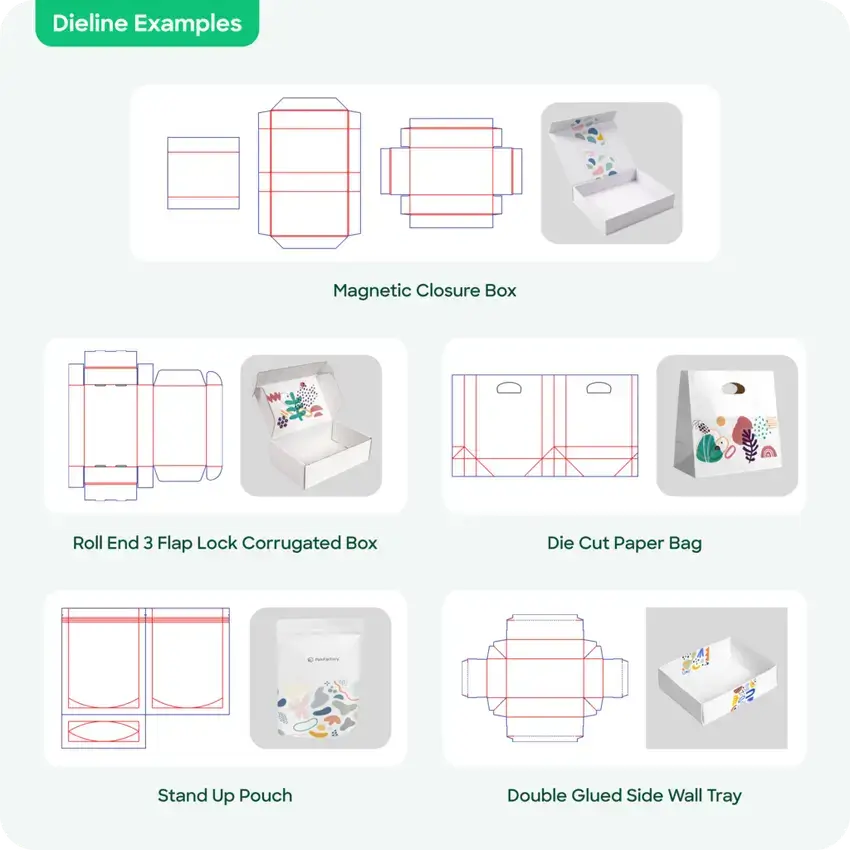
A dieline is a flat, 2D blueprint showing where a piece of packaging will be cut, folded, and glued.
It is a vector outline of your packaging laid out flat, before assembly. Every face is visible at once, which is what lets a designer place artwork accurately and a manufacturer cut it precisely.
Think of it as the pattern a tailor cuts fabric against. The pattern is not the garment, but nothing gets made without it.

Why the Dieline Decides Whether Your Packaging Works
Every structural problem is cheap to fix on the dieline and expensive to fix after the die is built.
Three things depend on it:
- Error detection. The flat layout is where artwork, typography and dimension problems surface. Expect more than one round of revisions before it is signed off.
- 3D visualization. Imported into software like Pacdora or Esko Studio, a dieline becomes a digital mockup, so fold placement, proportions and color can be judged before anything is printed.
- The cutting die itself. Manufacturers build a physical steel die from your dieline. Once that die exists, changing the structure means building a new one.
What Do the Lines on a Dieline Mean?
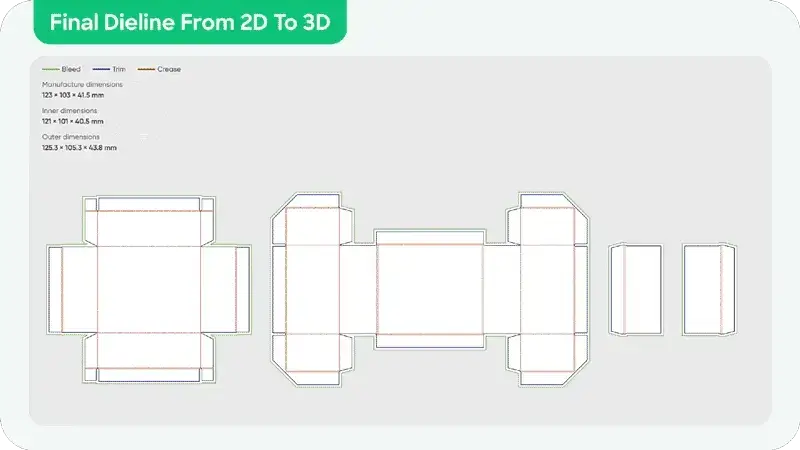
Each line is an instruction to a different machine or step, coded by style and color.
Colors vary between manufacturers and software. The elements below are consistent across the industry.
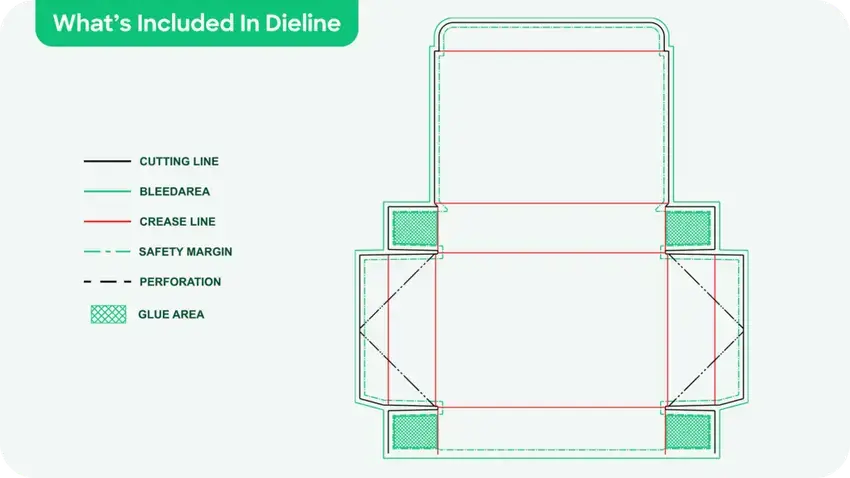
Always read the key on the dieline you have been given rather than assuming the colors match another supplier's. The same need for a shared language is why the corrugated industry codes its standard constructions rather than describing them: the FEFCO-ESBO International Fiberboard Case Code exists, in its publishers' words, "to substitute long and complicated verbal descriptions of fiberboard case and packaging constructions with simple symbols internationally understood by all."
What Is Bleed in Printing?
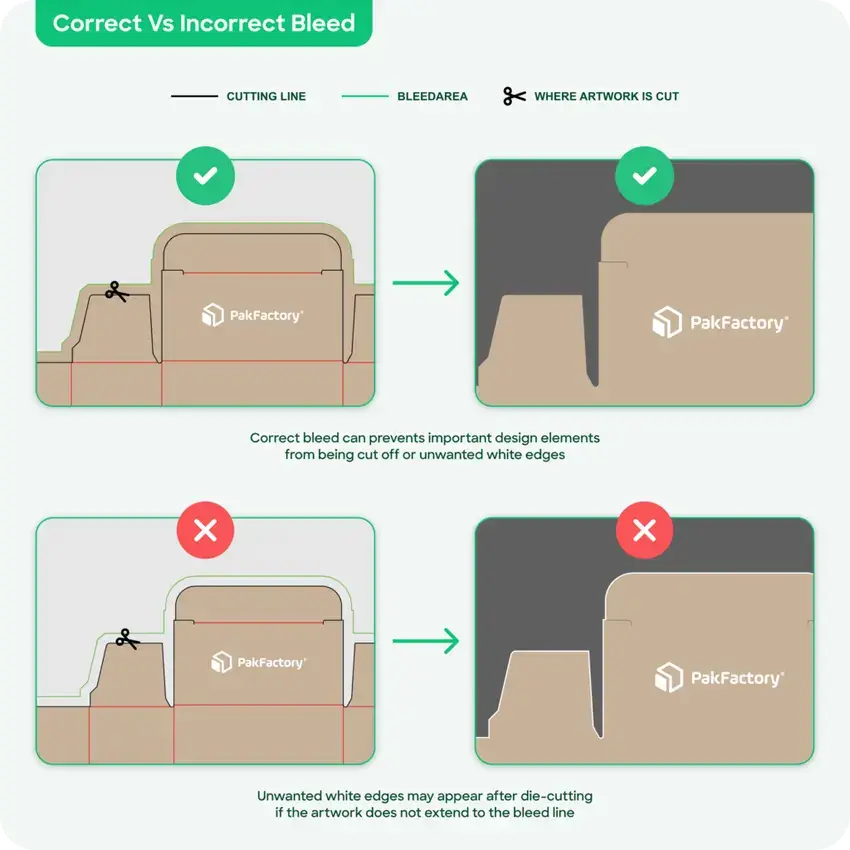
Bleed is artwork extended past the cut line so no white edge appears if the cut drifts. Adobe gives 0.125 inches, or 3 mm, as the standard, and that is what we work to across every material.
The safe zone is its opposite number: a margin inside the cut line where nothing important sits. Ours is the same 0.125 inches, measured inward from the cut rather than outward.
Both exist because machines move. Material shifts fractionally as it feeds through a die-cutting press, so the cut never lands in exactly the same place twice.
- Without bleed, a cut that drifts outward leaves a white sliver along the edge of the box.
- Without a safe zone, a cut that drifts inward clips the logo.
The working rule: push backgrounds and decorative graphics out to the bleed line, and pull anything that has to be readable inside the safe zone.
How to Create a Dieline in Illustrator
A dieline can be drawn in Adobe Illustrator. Here is how that is done, and where it stops being enough.
Knowing the process is useful even if you never draw one, because it is what lets you read a dieline and brief a designer without guessing.
1. Set the document up. Units in inches or millimetres, color mode CMYK, artboard set to the flat size, meaning the full unfolded dimensions rather than the assembled box.
2. Separate the layers. A Dieline layer, an Artwork layer, and a separate layer for each special finish such as gold foil, so the cutting instructions and the finish positions both stay isolated from the printed design.
3. Draw the cut line. The outer profile of the flat shape, as a vector path. This is what the die follows.
4. Add fold lines and glue tabs as separate paths, visually distinct from the cut line so they are not read as cuts.
5. Put each line type on a spot color, named cut and crease. A spot swatch is what keeps the dieline separable at prepress and stops it printing as part of the design. The names matter: prepress looks for those two, and anything on a spot swatch will not print.
6. Offset for bleed and safe zone. Expand the cut path outward by the bleed distance and inward by the safe margin, and use both as guides.
7. Save as layered vector AI, EPS or PDF, CMYK, dieline layer intact. Never flattened, never JPG or PNG.
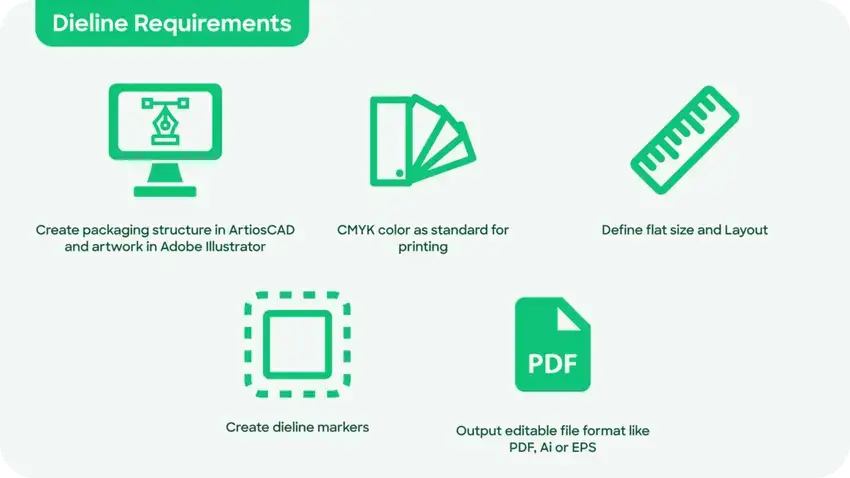
We do accept client-supplied dielines for production, validated through prepress before anything is cut. What a drawing program cannot do is account for the material, which is the subject of the next section.
Why Production Dielines Come From Structural Software
A drawing program does not know the material exists. Structural software calculates for it.
A box folded from 350 gsm board needs different allowances than the same shape in E-flute corrugated, because material has thickness, grain direction, and a load it has to carry. Those allowances are engineering, not geometry. It is the same reason the FEFCO-ESBO code records flute direction alongside cuts and scores: the material is part of the specification, not a finish applied afterwards.
- ArtiosCAD, from Esko, is built for structural packaging design and feeds die-cutting equipment directly. It is what we draw production dielines in.
- Pacdora provides template libraries and 3D mockups, useful for standard shapes and quick visualization.
- Adobe Illustrator is an artwork tool. It is the right place to apply a design to a dieline, not to engineer one.
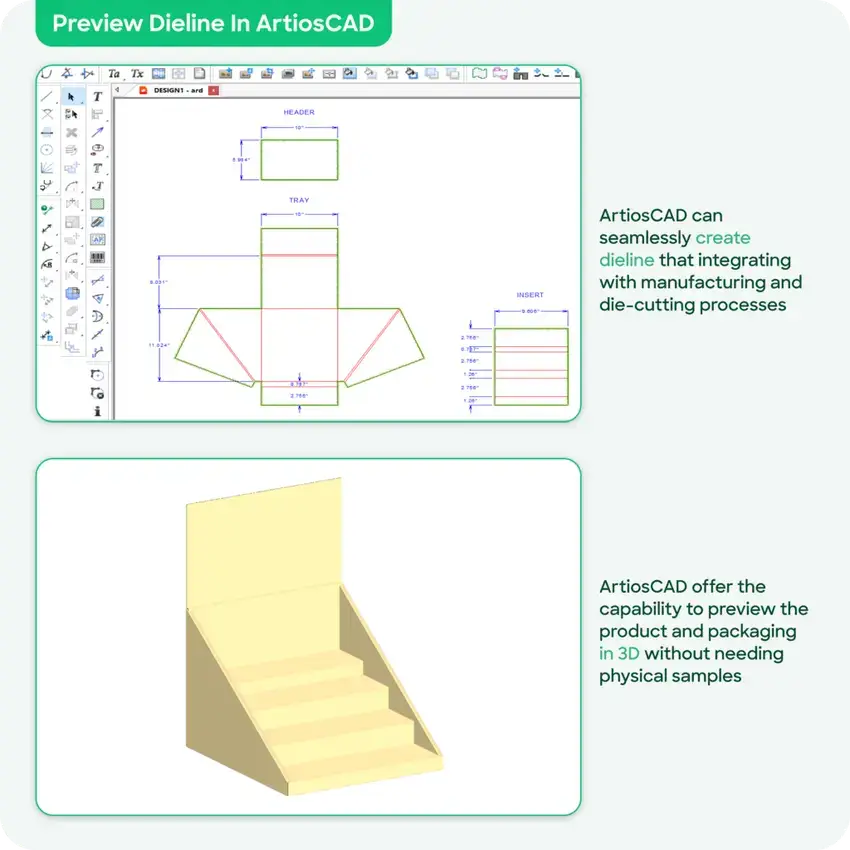
This is also why a dieline that looks correct can still fail. The geometry can be right while the allowances are wrong, and that only shows up in a sample or, worse, in production.
If you are producing with a manufacturer, none of this is your problem. We draw the dieline as part of the design stage.
How to Get a Dieline for Your Packaging
Ask your manufacturer for one. It is faster than commissioning a dieline, and it is the only version guaranteed to match the construction we will actually cut.
Send us your product dimensions, the packaging style you have in mind, and any existing packaging you want matched. We draw the dieline, validate it, and return it ready for artwork. A standard style is usually back with you in about two days. Custom structures take longer, because the structure has to be engineered before it can be drawn.
You may not need a custom dieline at all. Standard corrugated constructions are already catalogued: the FEFCO-ESBO code assigns each one a four-digit number, so a regular slotted case is 0201 and a full overlap case is 0206. Quoting the code is faster and less error-prone than describing the box, and it is the same reason stock styles cost less than bespoke ones.
Request a dieline for your packaging and we will draw one to your product's dimensions.
If you already have a dieline
Some brands arrive with a structural designer and a finished file. We validate every supplied dieline through prepress before production, against these requirements.
Digitally printed corrugated has one addition: rich black builds as 30% cyan, 30% magenta, 30% yellow and 100% black. Our artwork preparation guide and artwork and design guideline carry the full specifications, including barcode sizing and inside-print setup.
What sends a file back. Four problems account for most of what prepress returns:
- Missing linked images. Links that were neither embedded nor supplied alongside the file.
- Missing or un-outlined fonts. Type that has not been converted to outlines.
- A special finish with no position marked. The spec calls for gold foil or similar, but the artwork does not show where it applies. This is what the finish layer in the table above is for.
- Artwork that is not vector. Files that were never vectorized, or that rely on low-resolution images.
From Dieline to Finished Box
Once the dieline is signed off, it becomes physical. A plywood board is laser-cut to your exact paths, steel blades are set into those channels, and that die is pressed through the printed material under heavy force. Printing first, cutting second. From that point the structure is fixed, which is why the dieline is signed off before anything is built.
Our guide to the die cutting process covers the mechanics, and RSC versus die-cut boxes explains when a custom die is worth it against a stock corrugated style.
Talk to our team about your packaging project.
Sources
- FEFCO and ESBO, FEFCO-ESBO International Fiberboard Case Code. The code of designs for corrugated constructions, adopted by the International Corrugated Case Association.
- Adobe, Set print bleed.
Frequently asked questions
What does dieline mean?
A dieline is the flat vector blueprint of a piece of packaging, showing where it will be cut, folded and glued. The name comes from the cutting die that is built from it.
Is it dieline or dyeline?
Dieline is correct in packaging. "Dyeline" is a different thing, an older diazo copying process used for architectural drawings, and it comes up mainly as a spelling confusion.
How much bleed should I leave?
0.125 inches, or 3 mm, past the cut line is standard, per Adobe's own print guidance, and that is what we work to across every material. Extend backgrounds to that line and keep text and logos inside the safe zone.
Does the dieline get printed on my packaging?
No. The dieline is instruction, not design. It sits on its own layer in its own spot colors so prepress can separate it out, and it does not appear on the finished box.
Are dieline cut lines always red?
No. Colors vary by manufacturer and software. Red is common for fold lines and black for cut lines, but read the key on the dieline you have rather than assuming.
What file format should a dieline be?
A vector format that keeps paths editable. We accept AI, EPS and PDF, in CMYK, up to 100 MB. A flattened JPG or PNG contains no cutting paths and cannot be used.
How long does it take to get a dieline?
For a standard style, usually about two days. Custom structures take longer depending on complexity, since the structure has to be engineered before it can be drawn.
Who creates the dieline, me or the manufacturer?
The manufacturer, in almost every case. If you are producing with us, we draw it as part of the design stage and validate it before production.
What is a FEFCO code?
A four-digit number identifying a standard corrugated box construction, published by FEFCO and ESBO and adopted by the International Corrugated Case Association. Quoting the code replaces describing the box.
Can I make a dieline in Canva?
Not a production one. Canva has no vector path export suitable for die cutting and no spot color support.
Original article by
5+ years in content strategy — building packaging case studies, guides, and blogs.